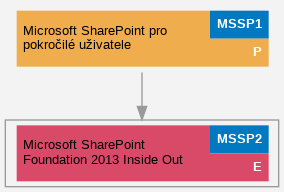
Microsoft SharePoint Foundation 2013 Inside Out (MSSP2)
Tento intenzivní a na ?eském trhu jedine?ný kurz poskytne IT profesionál?m znalosti a zkušenosti pot?ebné pro implementaci a správu ?ešení na platform? SharePoint Foundation 2013.
B?hem t?í dn? spole?n? odhalíme taje a principy fungování platformy SharePoint Foundation 2013, spole?n? projdeme vše, od instalace po nastavení služeb, od plánování architektury po tvorbu ?ešení, od serveru po koncového uživatele, zkrátka SharePoint Foundation 2013 od A do Z.
Autorem kurzu je Kamil Ju?ík, lektor školicího st?ediska PC-DIR a jediný držitel prestižního ocen?ní Microsoft MVP v kategorii SharePoint Server v ?R.
Po absolvování tohoto kurzu získáte:
• Komplexní p?ehled o možnostech a scéná?ích využití platformy SharePoint Foundation 2013
• Cenné informace pot?ebné pro plánování SharePoint architektury
• Detailní znalosti pot?ebné pro správnou instalaci a nastavení SharePoint služeb a jejich využití
• Pochopení princip? zabezpe?ení SharePoint služeb
• Schopnosti pro tvorbu uživatelských ?ešení
| Kurz je zařazen v kategorii: |
Aplika?ní a serverové služby → SharePoint Microsoft |
Náro�nost kurzu: expert
Délka kurzu: 3 dny
Náplň kurzu:
- P?edstavení platformy SharePoint Foundation 2013
- Lekce:
- • SharePoint 2013 Platform Overview and User Scenarios
- • Why SharePoint?
- • SharePoint 2013 Editions
- • SharePoint 2013 Building Blocks
- • SharePoint 2013 Enhancements
- • Licensing SharePoint 2013 and related products and technologies
- Instalace SharePoint Foundation 2013
- Lekce:
- • Hardware and Software Requirements
- • SharePoint 2013 Architecture and Terminology
- • Understanding Farm Topologies
- • Service Application Architecture
- • Service Accounts Best Practices
- Lab:
- • Preparing SharePoint 2013 Installation Source
- • Installing SharePoint 2013 Pre-Requisites
- • Installing SharePoint Foundation 2013
- • Installing SharePoint 2013 Language Packs
- Konfigurace SharePoint Foundation 2013
- Lekce:
- • SharePoint 2013 Central Administration Overview
- • Service Application Architecture
- • Managed Accounts
- • Farm Configuration Wizard Pros and Cons
- • Configuring Service Applications
- Lab:
- • Setting Up Managed Accounts and Password Change Settings
- • Using Farm Configuration Wizard
- Vytvá?ení a správa webových aplikací, webových kolekcí a web?
- Lekce:
- • Preparing DNS and Host Headers
- • Creating and Extending Web Applications
- • Alternate Access Mappings
- • Planning Content Databases
- • Site Collections and Sites
- • Site Collection Quotas and Locks Best Practices
- • Site Templates in SharePoint Foundation 2013
- Lab:
- • Configuring DNS and Host Headers
- • Creating and Extending Web Applications
- • Configuring Alternate Access Mappings
- • Creating Site Collections
- • Database Considerations and Best Practices
- • Assigning Site Collection Quotas and Locks
- • Creating Sites
- ?ízení a správa zabezpe?ení a p?ístup? v SharePoint 2013
- Lekce:
- • Intranet/Extranet/Intranet Considerations
- • Configuring Anonymous Access
- • Configuring Certificates and SSL
- • Managing the Farm Administrators Group
- • Managing Site Collection Administrators
- • Web Application User Permission Policies
- • User Permissions and Permission Levels
- Lab:
- • Assigning SSL Certificates
- • Setting Up Web Application Authentication Providers
- • Setting Up Anonymous Access on Web Applications and Sites
- • Managing the Farm Administrators Group
- • Managing Site Collection Administrators
- • Creating SharePoint Groups and Custom Permission Levels
- • Assigning User Permissions
- SharePoint Services 3.0 / SharePoint Foundation 2010 to SharePoint Foundation 2013 Upgrade (volitelná kapitola)
- Lekce:
- • Preparing a WSS 3.0 / SharePoint Foundation 2010 Farm
- • Database Attach Upgrade
- • 3rd-party Migration Tools
- Konfigurace vyhledávání v SharePoint Foundation 2013
- Lekce:
- • SharePoint Foundation 2013 Search Overview and Configuration
- Lab:
- • Configuring the SharePoint Foundation 2013 Search Service
- Instalace a konfigurace Office Web Apps 2013
- Lekce:
- • Office Web Apps Architecture
- • Describing User Scenarios
- • Licensing Requirements
- Lab:
- • Installing and configuring Office Web Apps
- • Using Office Web Apps in Real World Scenarios
- Nastavení a práce s Business Data Connectivity Service
- Lekce:
- • Introduction to the Business Data Connectivity Service
- • External Content Types
- Lab:
- • Setting Up Business Data Connectivity Service Application
- • Creating External Content Types
- • Creating External lists and External Data Columns
- Zálohování, obnova a Disaster Recovery
- Lekce a lab:
- • Versioning and Restoring Documents
- • Configuring Recycle Bin Behavior
- • Site Collection, Site and List Level Backup and Restore Solutions
- • Gradual Site and Site Collection Delete and Restore
- • Preparing for Disaster Recovery
- Monitorování výkonu a optimalizace prost?edí
- Lekce:
- • Health Analyzer and Diagnostic Logging
- • SharePoint Cache Optimization
- Lab:
- • Setting Up Diagnostic Logging
- • Reviewing Health Analyzer Reports
- • SharePoint 2013 Monitoring
- Dopl?kové funkce a služby
- Lekce:
- • Configuring Outgoing and Incomming E-mail Settings
- • Using Alerts
- • Administering SharePoint 2013 using PowerShell
- • Solution Packages and Best Practice Deployment
- • Deploying and Managing Farm Solutions
- Lab:
- • Configuring Outgoing and Incomming E-mail Settings
- • Creating and Managing Alerts
- • Using PowerShell Sample Scripts
- • Deploying and Activating Custom SharePoint Solutions
- • SharePoint 2013 3rd Party Solutions and AddOns
PÅ™edpokládané znalosti: Základní znalost administrace Windows Server, Active Directory, SQL Server a sí?ové infrastruktury
Časový rozvrh: 9:00 - 17:00
.TermÃny kurzu:
Doporu�ené předchozà a návazné kurzy: